Home › Communication & Network Security
ARP Explained: How Attackers Find Devices on Your Network
Communication & Network SecurityCISSPSecurity+CySA+
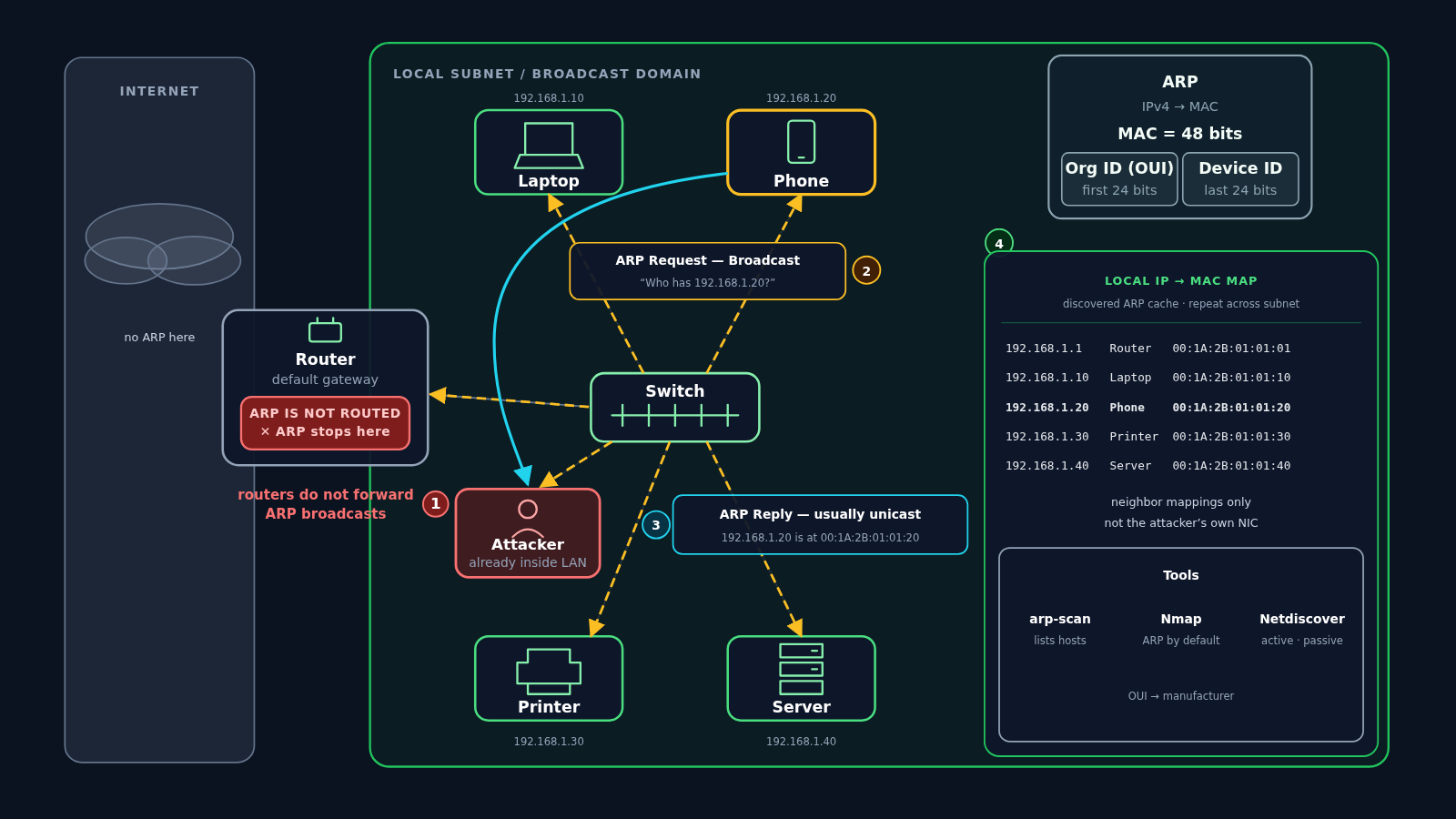
Once an attacker is inside your local network, a normal network protocol can show them the other devices on it. In this video, I'll walk through how the Address Resolution Protocol (ARP) works, why it only works inside the local network, and how one broadcast question and one reply, repeated across the subnet, give an attacker a map of IP and MAC addresses.
What you will learn
- What ARP does: finds the MAC (Media Access Control) address that belongs to a local IPv4 address
- How a 48-bit MAC address splits: 24-bit organization ID (OUI) and 24-bit device ID
- Why there is no ARP on the internet, and why the router (the default gateway) does not forward ARP broadcasts
- The local subnet, or broadcast domain, and the switch that connects its devices
- Why the attacker must already be inside the LAN, and the devices they want to find
- The ARP request: one broadcast asking "Who has 192.168.1.20?"
- The ARP reply: usually unicast, straight back to the attacker
- How repeated requests build a local IP → MAC map of the neighbours
- The tools attackers use to automate ARP discovery: arp-scan, Nmap, and Netdiscover